

Swarm: Per-Item DAG Dispatch
A swarm runs one work agent per plan item, in parallel, on the same issue. Each agent gets its own git worktree and slot branch. The dispatcher uses the plan’sblocks edges as a DAG: an item becomes dispatchable the moment every blocking parent has merged or completed, not when its wave does.
When to Use a Swarm
A swarm fits when an issue’s xBRIEF plan splits into several items that can be implemented independently. If the plan is one linear sequence, a single work agent is faster — there is nothing to parallelize. Use a swarm when:- The plan has 3+ items with parallel branches in the DAG.
- Items touch disjoint files (or you have planned
files_scopeso the dispatcher can serialize the overlapping ones). - You want a synthesis step at convergence points to brief the downstream work agent.
Mental Model
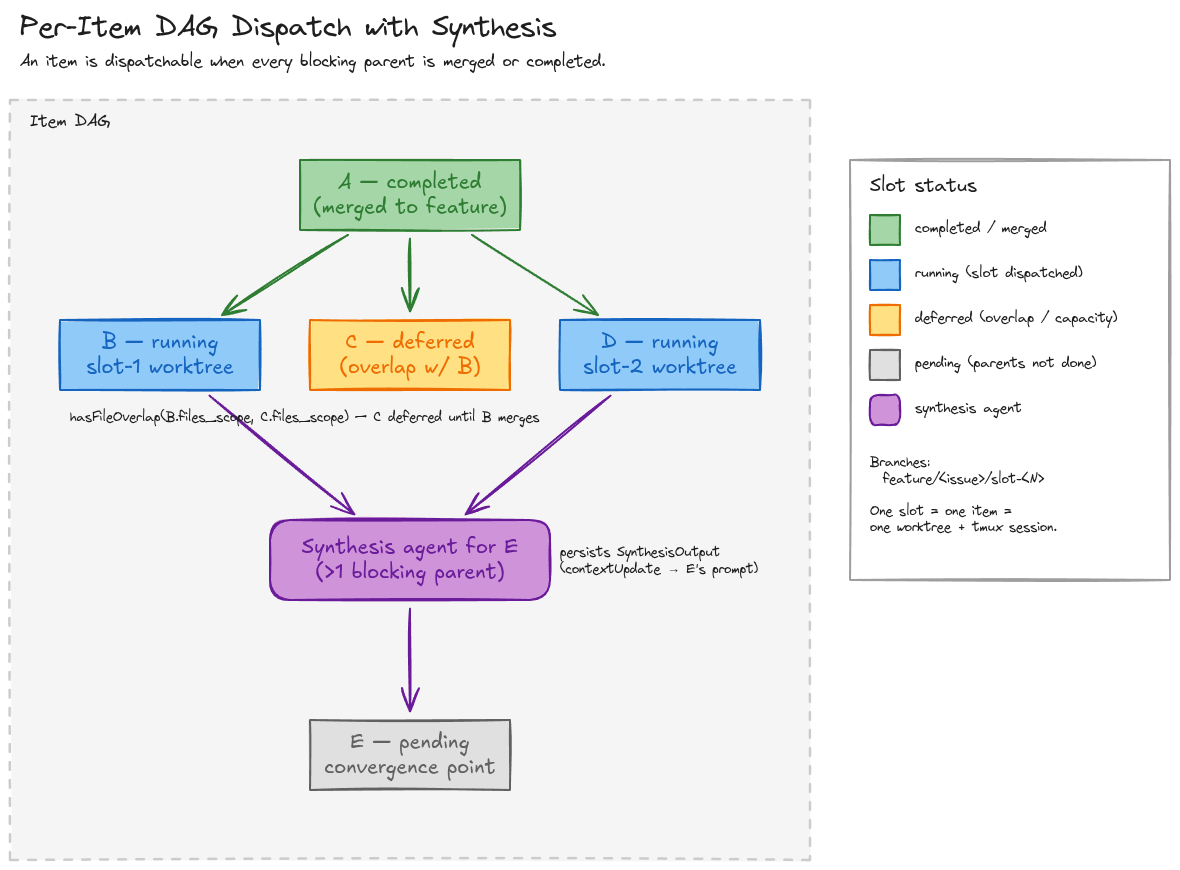
blocks edges. A has merged into the feature branch. B and D are running in slots 1 and 2. C is ready, but its files_scope overlaps B’s, so the dispatcher defers it. E has two blocking parents (B and D) — a synthesis agent runs at the convergence point, writes a SynthesisOutput, and the E work-agent reads that context block from its prompt.
Slot Lifecycle
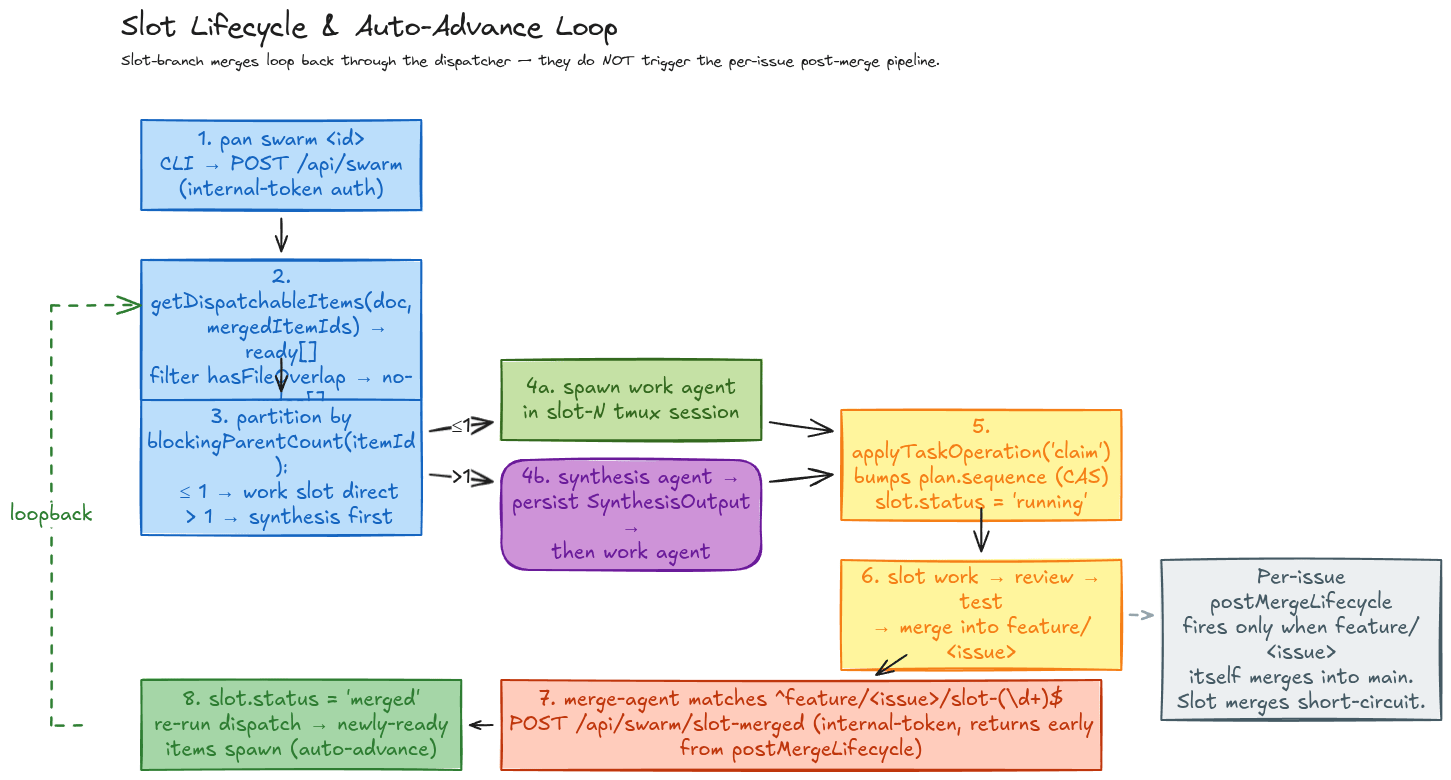
/api/swarm/slot-merged. The route marks the slot merged, re-runs getDispatchableItems, and dispatches any newly-ready items (subject to capacity and file-overlap rules). The per-issue postMergeLifecycle only fires when feature/<issue> itself merges into main — slot merges return early.
A slot whose status is 'failed' does not unblock its dependents.
Each running slot is a registered work agent, so the dashboard’s Agents page surfaces every slot in flight alongside its model, runtime, and last activity — the same place you watch any single-agent run. The metric strip (Running, Stuck, Cost 24h, Tokens 24h, Queue) lets you confirm at a glance how many slots a swarm currently occupies.
CLI
Inspect and Mutate Items
The plan document is the single mutation authority for item status. Every mutation bumpsplan.sequence (compare-and-set).
--sequence <n> to enforce CAS. A mismatch raises xBRIEF sequence conflict and the write is rejected.
HTTP Surface
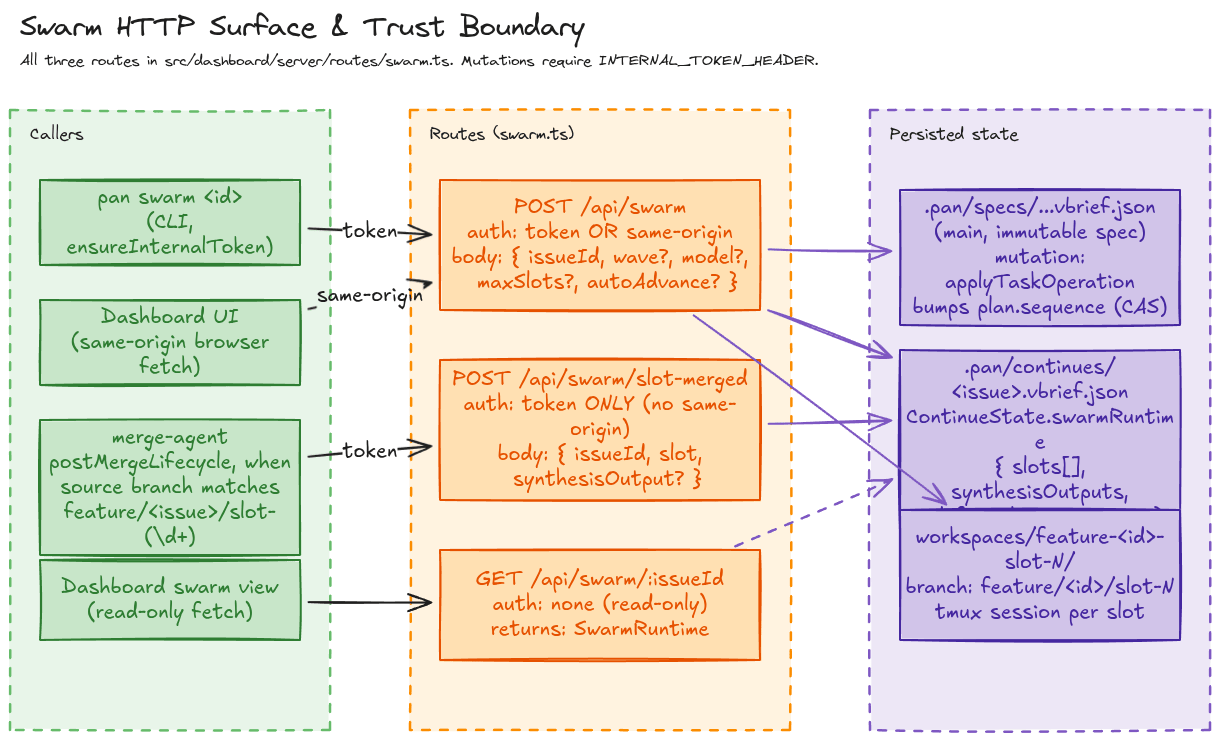
INTERNAL_TOKEN_HEADER. POST /api/swarm additionally accepts same-origin dashboard requests. POST /api/swarm/slot-merged is token-only — the merge-agent is the only legitimate caller.
Plan Authoring: files_scope and Synthesis
Two fields on XBriefItem.metadata control swarm behavior.
Plans that omit
files_scope will still run — but every parallel pair is treated as non-overlapping, so two slots could race the same file. Author files_scope whenever items can plausibly touch the same code.
Runtime State
Swarm runtime state lives in<projectRoot>/.pan/continues/<issue>.xbrief.json under ContinueState.swarmRuntime. The old PAN-970 sidecar (~/.overdeck/swarms/<id>.json) is gone.
Watching a Swarm in the Pipeline
A swarm is still one issue moving through the pipeline — the parallelism is internal to its work phase. The Pipeline page groups every issue by phase (Ship / Review / Verifying) under a metric strip (Active issues, Work running, Review queue, Ship, Spend), with a live activity feed on the right. Once a swarm’s slots merge up intofeature/<issue> and the issue advances, you track its progress here just like any other issue.
Related
- Convoys — multi-agent code review (different orchestration pattern).
- Cloister — model routing, stuck detection, specialist handoffs.
- Engineering reference:
docs/SWARM.md— full library API, route bodies, sequence-number rules.