> ## Documentation Index
> Fetch the complete documentation index at: https://panopticon-cli.com/llms.txt
> Use this file to discover all available pages before exploring further.
# Swarm
> Per-item DAG dispatch — many work agents on one issue, in parallel
export const ThemedImage = ({light, dark, alt = ""}) => <>

 ;
# Swarm: Per-Item DAG Dispatch
A swarm runs one work agent per plan item, in parallel, on the same issue. Each agent gets its own git worktree and slot branch. The dispatcher uses the plan's `blocks` edges as a DAG: an item becomes dispatchable the moment every blocking parent has merged or completed, not when its wave does.
## When to Use a Swarm
A swarm fits when an issue's vBRIEF plan splits into several items that can be implemented independently. If the plan is one linear sequence, a single work agent is faster — there is nothing to parallelize.
Use a swarm when:
* The plan has 3+ items with parallel branches in the DAG.
* Items touch disjoint files (or you have planned `files_scope` so the dispatcher can serialize the overlapping ones).
* You want a synthesis step at convergence points to brief the downstream work agent.
## Mental Model
;
# Swarm: Per-Item DAG Dispatch
A swarm runs one work agent per plan item, in parallel, on the same issue. Each agent gets its own git worktree and slot branch. The dispatcher uses the plan's `blocks` edges as a DAG: an item becomes dispatchable the moment every blocking parent has merged or completed, not when its wave does.
## When to Use a Swarm
A swarm fits when an issue's vBRIEF plan splits into several items that can be implemented independently. If the plan is one linear sequence, a single work agent is faster — there is nothing to parallelize.
Use a swarm when:
* The plan has 3+ items with parallel branches in the DAG.
* Items touch disjoint files (or you have planned `files_scope` so the dispatcher can serialize the overlapping ones).
* You want a synthesis step at convergence points to brief the downstream work agent.
## Mental Model
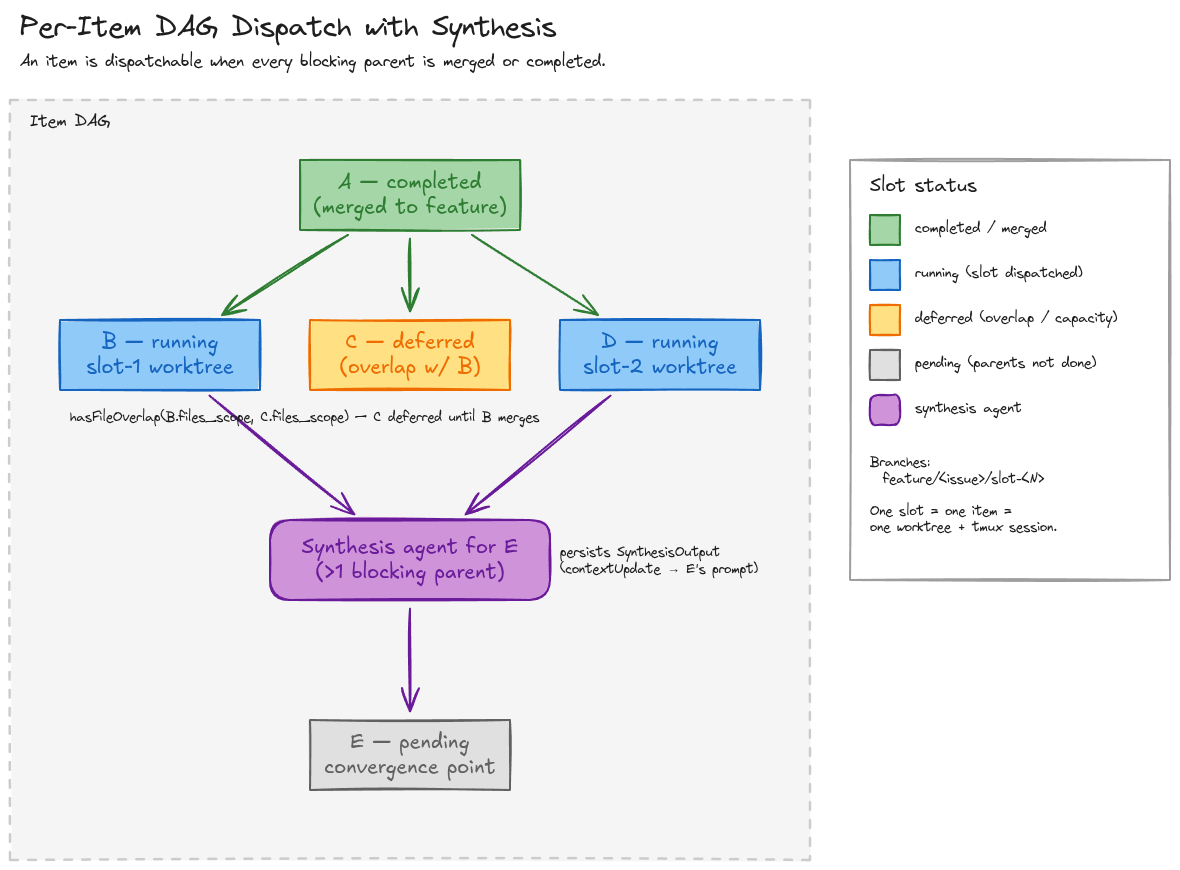 Items A, B, C, D, E are vBRIEF items wired by `blocks` edges. A has merged into the feature branch. B and D are running in slots 1 and 2. C is ready, but its `files_scope` overlaps B's, so the dispatcher defers it. E has two blocking parents (B and D) — a **synthesis agent** runs at the convergence point, writes a `SynthesisOutput`, and the E work-agent reads that context block from its prompt.
| Surface | Single-agent (default) | Swarm slot |
| --------------- | ----------------------------- | ----------------------------- |
| Branch | `feature/` | `feature//slot-` |
| Worktree | `workspaces/feature-/` | per-slot worktree |
| tmux session | `agent-` | per-slot session |
| Plan visibility | Full plan | Active-slice (bounded) prompt |
## Slot Lifecycle
Items A, B, C, D, E are vBRIEF items wired by `blocks` edges. A has merged into the feature branch. B and D are running in slots 1 and 2. C is ready, but its `files_scope` overlaps B's, so the dispatcher defers it. E has two blocking parents (B and D) — a **synthesis agent** runs at the convergence point, writes a `SynthesisOutput`, and the E work-agent reads that context block from its prompt.
| Surface | Single-agent (default) | Swarm slot |
| --------------- | ----------------------------- | ----------------------------- |
| Branch | `feature/` | `feature//slot-` |
| Worktree | `workspaces/feature-/` | per-slot worktree |
| tmux session | `agent-` | per-slot session |
| Plan visibility | Full plan | Active-slice (bounded) prompt |
## Slot Lifecycle
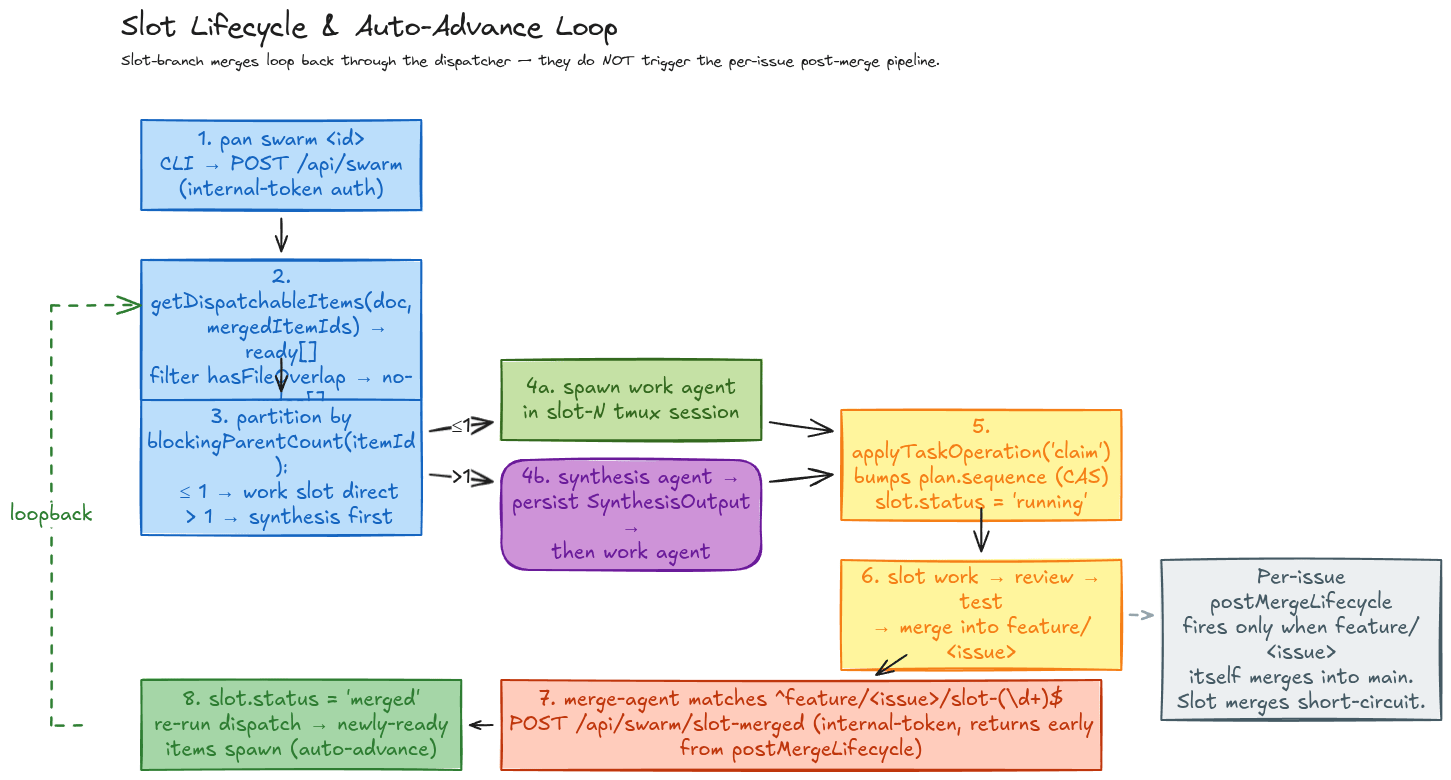 Every slot-branch merge fires `/api/swarm/slot-merged`. The route marks the slot `merged`, re-runs `getDispatchableItems`, and dispatches any newly-ready items (subject to capacity and file-overlap rules). The per-issue `postMergeLifecycle` only fires when `feature/` itself merges into `main` — slot merges return early.
A slot whose status is `'failed'` does **not** unblock its dependents.
Each running slot is a registered work agent, so the dashboard's **Agents** page surfaces every slot in flight alongside its model, runtime, and last activity — the same place you watch any single-agent run. The metric strip (Running, Stuck, Cost 24h, Tokens 24h, Queue) lets you confirm at a glance how many slots a swarm currently occupies.
## CLI
```bash theme={null}
pan swarm # Spawn dispatchable items now
pan swarm --dry-run # Print dispatch plan; no spawns
pan swarm --max-slots # Cap concurrency
pan swarm --model # Override slot-agent model
pan swarm --auto-advance # Auto-dispatch as slots merge
pan swarm --no-auto-advance # Manual mode; explicit per wave
```
### Inspect and Mutate Items
The plan document is the single mutation authority for item status. Every mutation bumps `plan.sequence` (compare-and-set).
```bash theme={null}
pan swarm --task next # List dispatchable items
pan swarm --task show --item # Show one item
pan swarm --task claim --item # Mark running
pan swarm --task done --item # Mark completed
pan swarm --task block --item --reason ""
pan swarm --task unblock --item
pan swarm --task cancel --item
```
Pass `--sequence ` to enforce CAS. A mismatch raises `vBRIEF sequence conflict` and the write is rejected.
## HTTP Surface
Every slot-branch merge fires `/api/swarm/slot-merged`. The route marks the slot `merged`, re-runs `getDispatchableItems`, and dispatches any newly-ready items (subject to capacity and file-overlap rules). The per-issue `postMergeLifecycle` only fires when `feature/` itself merges into `main` — slot merges return early.
A slot whose status is `'failed'` does **not** unblock its dependents.
Each running slot is a registered work agent, so the dashboard's **Agents** page surfaces every slot in flight alongside its model, runtime, and last activity — the same place you watch any single-agent run. The metric strip (Running, Stuck, Cost 24h, Tokens 24h, Queue) lets you confirm at a glance how many slots a swarm currently occupies.
## CLI
```bash theme={null}
pan swarm # Spawn dispatchable items now
pan swarm --dry-run # Print dispatch plan; no spawns
pan swarm --max-slots # Cap concurrency
pan swarm --model # Override slot-agent model
pan swarm --auto-advance # Auto-dispatch as slots merge
pan swarm --no-auto-advance # Manual mode; explicit per wave
```
### Inspect and Mutate Items
The plan document is the single mutation authority for item status. Every mutation bumps `plan.sequence` (compare-and-set).
```bash theme={null}
pan swarm --task next # List dispatchable items
pan swarm --task show --item # Show one item
pan swarm --task claim --item # Mark running
pan swarm --task done --item # Mark completed
pan swarm --task block --item --reason ""
pan swarm --task unblock --item
pan swarm --task cancel --item
```
Pass `--sequence ` to enforce CAS. A mismatch raises `vBRIEF sequence conflict` and the write is rejected.
## HTTP Surface
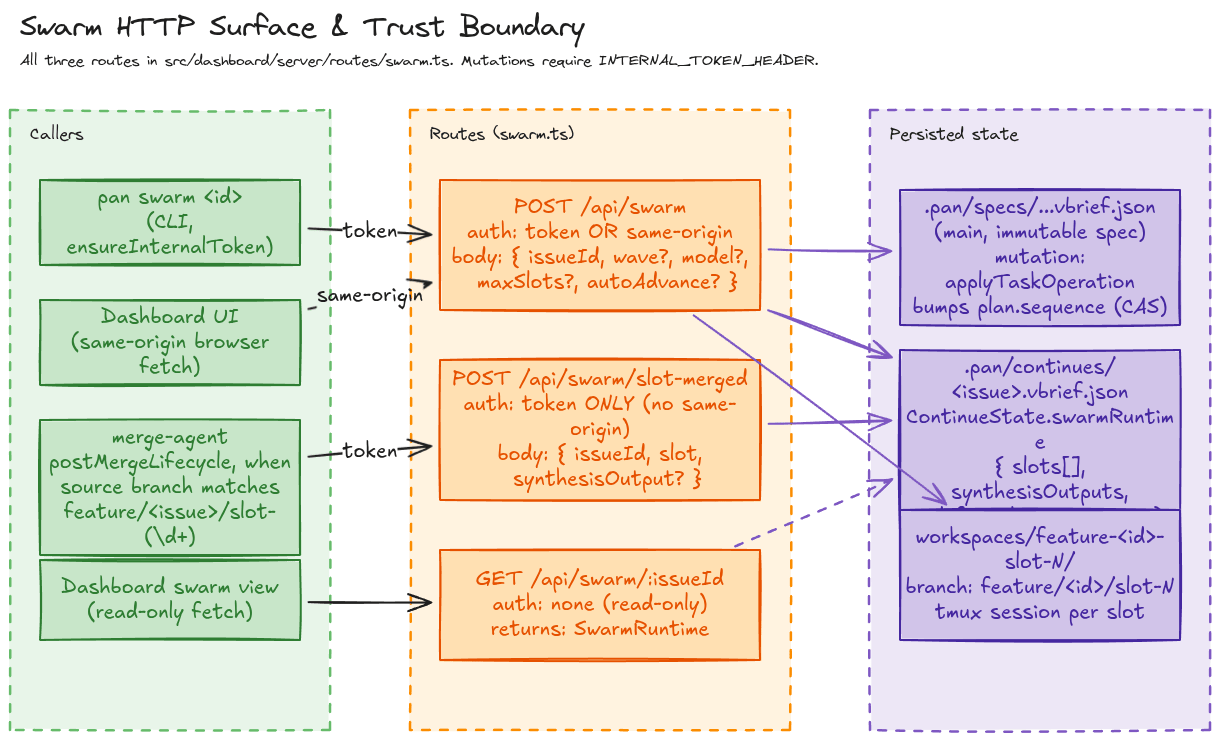 The two mutating routes require `INTERNAL_TOKEN_HEADER`. `POST /api/swarm` additionally accepts same-origin dashboard requests. `POST /api/swarm/slot-merged` is token-only — the merge-agent is the only legitimate caller.
| Route | Auth | Purpose |
| ----------------------------- | ------------------------ | ---------------------------------- |
| `POST /api/swarm` | token **or** same-origin | Dispatch one or more slots |
| `POST /api/swarm/slot-merged` | token only | Loopback when a slot branch merges |
| `GET /api/swarm/:issueId` | none (read-only) | Dashboard swarm view |
## Plan Authoring: `files_scope` and Synthesis
Two fields on `VBriefItem.metadata` control swarm behavior.
| Field | Purpose |
| ---------------------------- | ------------------------------------------------------------------------------------------------------------------------------------------------------------------------ |
| `files_scope: string[]` | Globs (`**`, `*`, `?`) of files this item touches. Used by `hasFileOverlap()` to serialize file-conflicting items. Items without a scope are treated as non-overlapping. |
| `requiresSynthesis: boolean` | Auto-derived during planning by `deriveSynthesisMetadata()`. Set on any item with >1 blocking parent. Do not hand-edit. |
Plans that omit `files_scope` will still run — but every parallel pair is treated as non-overlapping, so two slots could race the same file. Author `files_scope` whenever items can plausibly touch the same code.
## Runtime State
Swarm runtime state lives in `/.pan/continues/.vbrief.json` under `ContinueState.swarmRuntime`. The old PAN-970 sidecar (`~/.overdeck/swarms/.json`) is gone.
```ts theme={null}
interface SwarmRuntime {
model: string;
currentWave?: number;
totalWaves?: number;
autoAdvance?: boolean;
deferred?: { itemId: string; itemTitle: string }[];
slots: SwarmSlotRuntime[];
synthesisOutputs: Record;
createdAt: string;
updatedAt: string;
}
```
## Watching a Swarm in the Pipeline
A swarm is still one issue moving through the pipeline — the parallelism is internal to its work phase. The **Pipeline** page groups every issue by phase (Ship / Review / Verifying) under a metric strip (Active issues, Work running, Review queue, Ship, Spend), with a live activity feed on the right. Once a swarm's slots merge up into `feature/` and the issue advances, you track its progress here just like any other issue.
## Related
* [Convoys](/features/convoys) — multi-agent code review (different orchestration pattern).
* [Cloister](/features/cloister) — model routing, stuck detection, specialist handoffs.
* Engineering reference: [`docs/SWARM.md`](https://github.com/eltmon/overdeck/blob/main/docs/SWARM.md) — full library API, route bodies, sequence-number rules.
The two mutating routes require `INTERNAL_TOKEN_HEADER`. `POST /api/swarm` additionally accepts same-origin dashboard requests. `POST /api/swarm/slot-merged` is token-only — the merge-agent is the only legitimate caller.
| Route | Auth | Purpose |
| ----------------------------- | ------------------------ | ---------------------------------- |
| `POST /api/swarm` | token **or** same-origin | Dispatch one or more slots |
| `POST /api/swarm/slot-merged` | token only | Loopback when a slot branch merges |
| `GET /api/swarm/:issueId` | none (read-only) | Dashboard swarm view |
## Plan Authoring: `files_scope` and Synthesis
Two fields on `VBriefItem.metadata` control swarm behavior.
| Field | Purpose |
| ---------------------------- | ------------------------------------------------------------------------------------------------------------------------------------------------------------------------ |
| `files_scope: string[]` | Globs (`**`, `*`, `?`) of files this item touches. Used by `hasFileOverlap()` to serialize file-conflicting items. Items without a scope are treated as non-overlapping. |
| `requiresSynthesis: boolean` | Auto-derived during planning by `deriveSynthesisMetadata()`. Set on any item with >1 blocking parent. Do not hand-edit. |
Plans that omit `files_scope` will still run — but every parallel pair is treated as non-overlapping, so two slots could race the same file. Author `files_scope` whenever items can plausibly touch the same code.
## Runtime State
Swarm runtime state lives in `/.pan/continues/.vbrief.json` under `ContinueState.swarmRuntime`. The old PAN-970 sidecar (`~/.overdeck/swarms/.json`) is gone.
```ts theme={null}
interface SwarmRuntime {
model: string;
currentWave?: number;
totalWaves?: number;
autoAdvance?: boolean;
deferred?: { itemId: string; itemTitle: string }[];
slots: SwarmSlotRuntime[];
synthesisOutputs: Record;
createdAt: string;
updatedAt: string;
}
```
## Watching a Swarm in the Pipeline
A swarm is still one issue moving through the pipeline — the parallelism is internal to its work phase. The **Pipeline** page groups every issue by phase (Ship / Review / Verifying) under a metric strip (Active issues, Work running, Review queue, Ship, Spend), with a live activity feed on the right. Once a swarm's slots merge up into `feature/` and the issue advances, you track its progress here just like any other issue.
## Related
* [Convoys](/features/convoys) — multi-agent code review (different orchestration pattern).
* [Cloister](/features/cloister) — model routing, stuck detection, specialist handoffs.
* Engineering reference: [`docs/SWARM.md`](https://github.com/eltmon/overdeck/blob/main/docs/SWARM.md) — full library API, route bodies, sequence-number rules.